Powered by Aero Ranger
Permits

Unlimited categories.
Verified documents.
Public portal.

Create any permit category your council needs, let the public apply online, verify supporting documents, then keep approved permits ready for patrol, compliance and review.

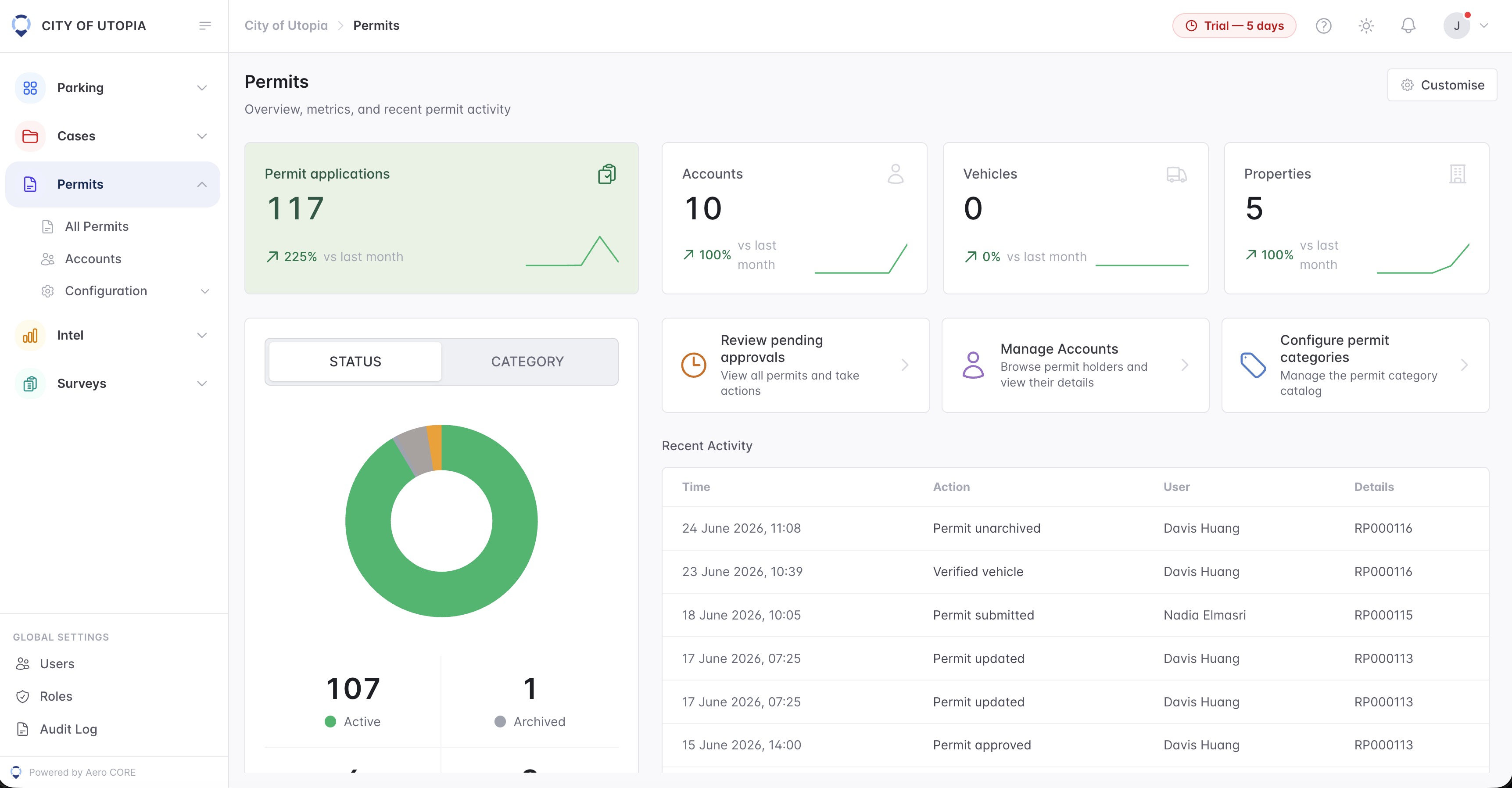
Aero Ranger permits dashboard overview with applications, accounts, vehicles, properties and recent activity
Unlimited
categories across parking, animals, events, works and local laws
Verified
documents, IDs, evidence and attachments checked before approval
Public
portal for applications, renewals and permit status updates
Operational widgets

Permit dashboards
with context beside them.

Each widget belongs to a real council workflow: intake volume, permit status, daily shortcuts and audit history.

Overview

See demand before opening the register.

Managers can understand the size of the permit workload at a glance: applications, accounts, linked vehicles and properties, with movement from the previous month.

  • Application and account totals stay visible for reporting.
  • Vehicle and property counts show what records are linked.
  • Month-on-month movement helps spot seasonal pressure.
Permit applications, at a glanceLive overview
117Permit applications+225% month on month
10Accounts+100% month on month
0Vehicles0% month on month
5Properties+100% month on month
Status breakdown

Know what is active, expired or pending.

The status widget turns the register into a quick operational answer, so staff can focus on approvals and expired permissions rather than hunting through rows.

  • Active permits are separated from expired and archived records.
  • Pending applications stay visible for supervisors.
  • Category mode can show the same register by permit type.
Where every permit sits todayStatus
Status Category
Active107
Expired6
Pending3
Archived1
Daily shortcuts

Put the common permit jobs one click away.

Officers and administrators can move from the dashboard into the exact job they need: approvals, holder accounts, category setup or a bulk import.

  • Review pending approvals without searching the full table.
  • Manage holders, linked accounts and category configuration.
  • Import resident or business permit lists when onboarding data.
Jump straight to the workShortcuts
Review pending approvalsView all permits and take actions.
Manage accountsBrowse permit holders and their details.
Configure categoriesManage the permit category catalogue.
Import permitsBulk add residents and businesses by CSV.
Audit trail

Keep every change tied to the permit record.

Submissions, approvals, edits and vehicle checks stay in sequence, giving staff a readable trail when a permit is reviewed, challenged or renewed.

  • Document checks and vehicle verification sit in the same history.
  • Staff can see who changed a permit and when.
  • Reference numbers remain visible for customer service and review.
Every change, logged in orderAudit
24 Jun 2026
Permit unarchivedJohn Smith
RP000116
23 Jun 2026
Verified vehicleJohn Smith
RP000116
18 Jun 2026
Permit submittedJane Doe
RP000115
17 Jun 2026
Permit updatedJohn Smith
RP000113
15 Jun 2026
Permit approvedJohn Smith
RP000113
Unlimited permit categories

Build a register around the work your council actually receives.

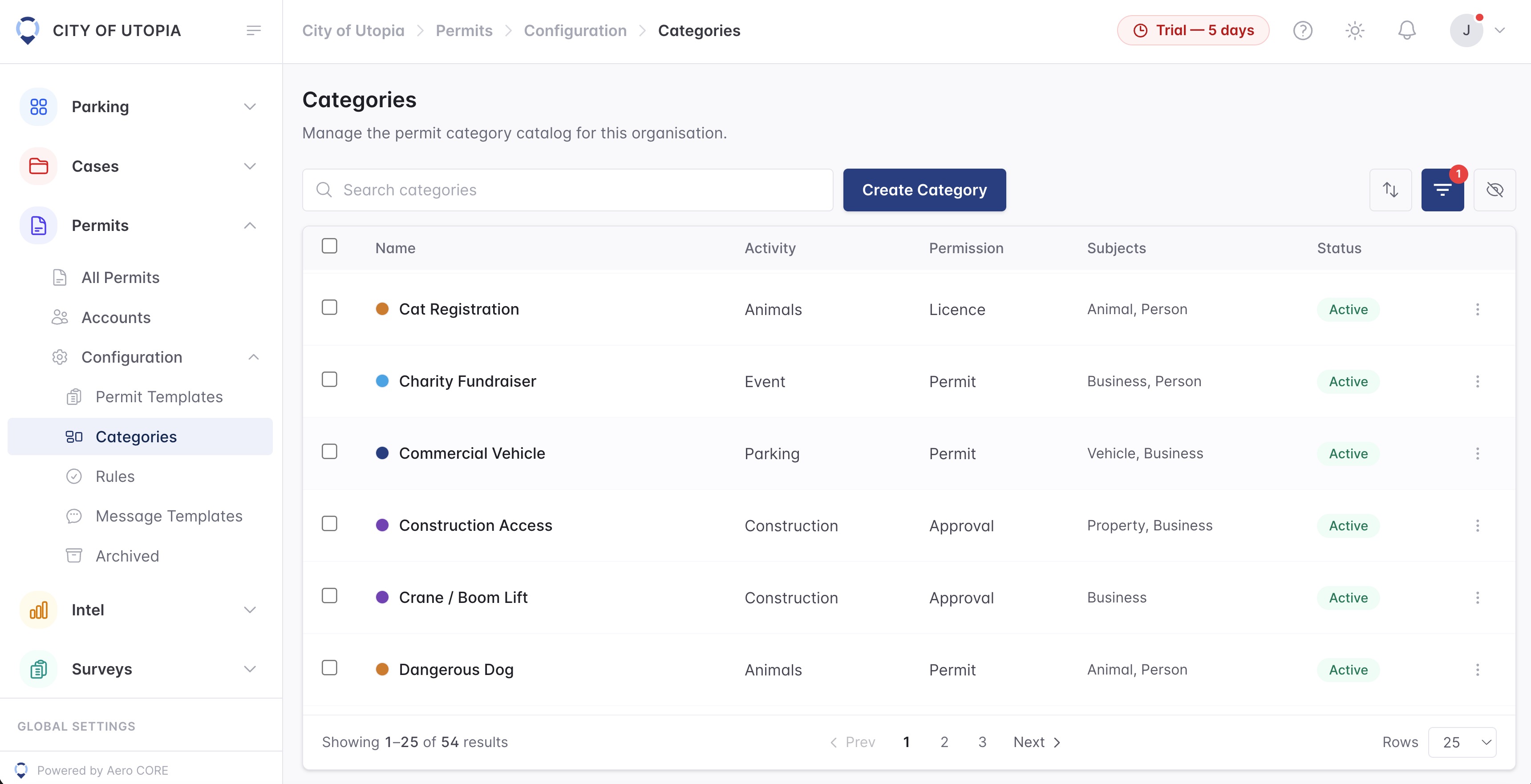
Parking permits can sit beside signage approvals, amplified sound consent, animal registrations, events, construction access, asbestos removal and any other local-law category without needing another system.

Signage Noise Animals
  • Unlimited categories for parking, animals, business, construction and events
  • Category-specific forms, subjects, fees and permission types
  • Public portal applications with supporting evidence attached
  • Approved records available to patrol teams and compliance workflows
Permit categories including animals, events, commercial vehicles and construction access
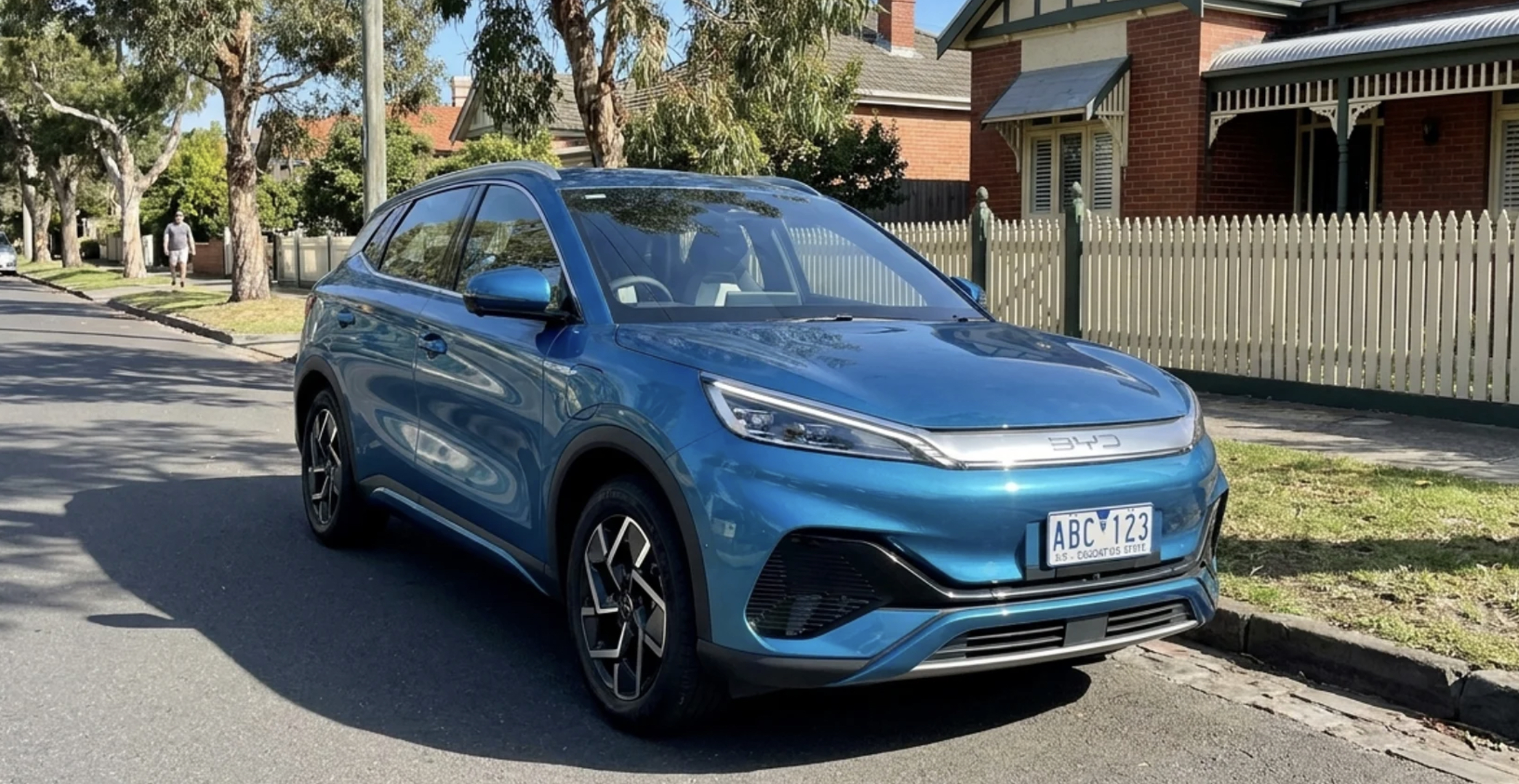
ABC123
Vehicle
Blue · BYD Atto 3

Resident Permit Matched

Resident Parking CarLink linked
Zone: R-04 Resident · Permit valid · City of Utopia · 23-04-2026 13:30:37
Blue BYD Atto 3 matched to a resident parking permit
Camera evidence image · Resident permit verified and flagged through CarLink
Ready for enforcement and review

Every application becomes
a verified record.

When applications, documents and approvals are connected, officers know what applies, managers can report by category, and compliance teams can keep evidence tied to the right permit activity. CarLink-integrated permits are flagged inside the platform so patrol teams can see when a vehicle is already covered.

Public application

Residents, businesses and contractors submit details through the portal.

Document verification

Staff review uploads, identity checks, eligibility evidence and attachments.

Approved permit

Approved records move into the operational register for patrol and reporting.

CarLink integration

Vehicle-linked permits are flagged in the platform through CarLink before patrol, review and reporting.

Permit categories

Smart rules. Zero noise.

Create permit categories with three-axis logic - zone violations, plate alerts and utilisation counting. Ignore council vehicles. Allow parking permits. Exclude miss reads. Each rule is one toggle.

Zone violationsIgnore
Plate alertsAllow
UtilisationCount
CategoryViolationsAlertsCount
Parking PermitIgnoreAllowCount
Miss ReadsIgnoreIgnoreDon't count
Executive ManagerIgnoreAllowCount
Ready to organise the full permit lifecycle

Every category.
Every document.
One portal.

See how Aero Ranger can manage permit categories, public applications, document verification and council approval workflows together.

Unlimited categoriesParking plus local laws
Document verificationEvidence checked before approval
Public portalApplications and renewals online
Approved registerReady for patrol and review
Built for councilsResidents, business and contractors

Experience the power of Aero Ranger

Bring parking, permits, inspections, evidence and reporting into one practical council workflow.