Bring parking, permits, inspections, evidence and reporting into one practical council workflow.
Changing rules
A street can be legal parking, loading only, no stopping or clearway depending on the time.
Aero Ranger helps teams manage loading zones, delivery windows and clearway restrictions by applying zone rules, vehicle type context, dwell time, evidence, alerts and case workflows.

Loading zones and clearways change by time of day, vehicle type and operational need. Teams need clear rules and evidence before creating a breach matter.
A street can be legal parking, loading only, no stopping or clearway depending on the time.
Delivery vehicles, taxis, contractors and private vehicles may need different review rules.
A short stop can block traffic, buses or deliveries during peak periods.
Kerbside matters need clear images, timestamps and the rule in force at the time.
The useful question is not which feature exists. It is whether the team can see the place, rule, evidence, exception, next action and review history before making a decision.
Configure loading, clearway and no-stopping windows by day and time.
Zones, profiles, schedules and overrides.Use configured vehicle restrictions and confidence thresholds where vehicle class matters.
Zone profiles, vehicle type and detection confidence.Measure whether a vehicle remained beyond the permitted loading or stopping window.
ANPR reads, first/last sightings and alert rules.Route high-impact kerbside matters into cases or officer alerts.
Parking alerts, cases and in-vehicle delivery.Map loading, clearway and no-stopping decisions to configured enforcement outcomes.
Parking offence mapping and local laws.Track breach patterns, repeat vehicles and peak kerbside pressure.
Intel, exports and vehicle replay.A kerbside review needs the vehicle class, location, time window, dwell duration, evidence image and configured rule together.

Model loading zones, delivery bays, clearways and no-stopping corridors with schedules.
Use vehicle type and permit records to understand whether access may be authorised.
Review repeated dwell, peak periods, events and business access pressure.
A kerbside review keeps schedule, vehicle type, dwell, obstruction and move-on or notice action together.
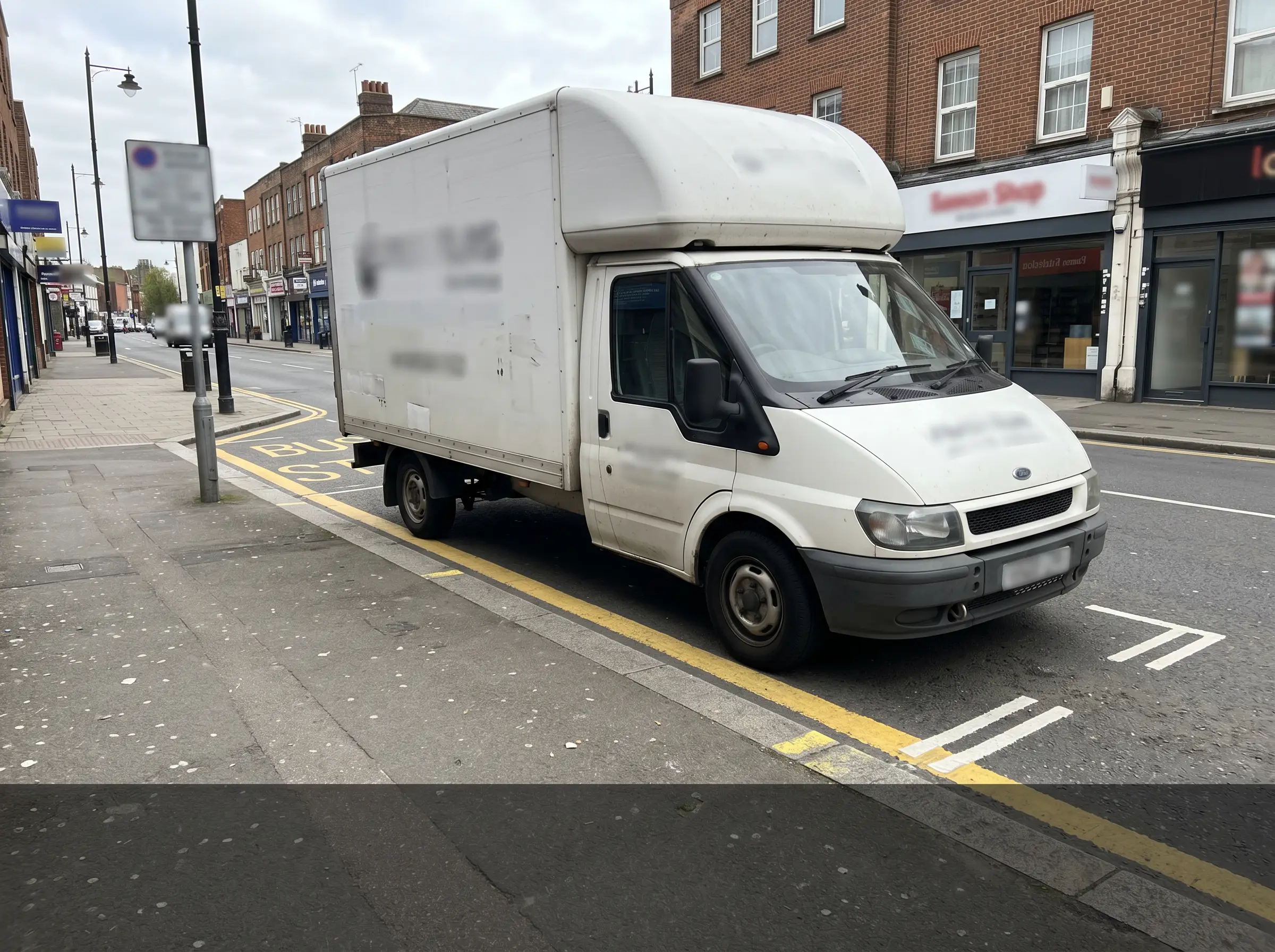 Vehicle stopped during active restriction
16:42 · Clearway corridor
Vehicle stopped during active restriction
16:42 · Clearway corridor
Vehicle stopped contrary to loading or clearway conditions
Aero Ranger keeps the issue photos, place context, rule context and follow-up state together so the case can be checked later without rebuilding the record.
The issue photo stays on KZ-38450 with the case note and current case status.
Site, street, reserve, bay, kerbside or zone context stays attached so reviewers can see where the issue occurred.
The relevant signage, permit condition, local-law category or operating rule is recorded beside the issue evidence.
Later photos, reinspection notes, notice evidence and closure decisions remain in the same case trail.
Loading zones and clearways are short-window rules. Council needs to separate active loading, passenger drop-off, authorised vehicles, clearway timing and genuine obstruction before deciding the outcome.
Check the sign, active hours, clearway schedule, loading allowance, vehicle type requirement and whether the vehicle was attended or actively loading.
Capture photos, repeated observations, duration, lane or bay impact, officer notes and any move-on direction.
Issue, warn, direct the vehicle to move, refer for tow where appropriate, or close with reasons, then report corridors under pressure.
Street segment, loading bay, clearway, active time window, signage notes and zone profile.
Rego, vehicle type, commercial indicator, dwell duration, activity observed and whether loading appears active.
ANPR reads, photos, timestamps, officer notes, repeat observations and schedule match result.
Alert, inspect, warn, issue, request move-on, refer for tow where appropriate, close or report.
Breach pressure by corridor, time of day, delivery window, repeat vehicles and traffic-impact areas.
Teams can configure priority corridors, loading areas and clearway periods, then use alerts and cases for repeat or high-impact breaches.
Create profiles for loading, clearway, no-stopping and timed windows.
Collect reads and evidence during active restriction periods.
Review vehicle type, permits, exemptions and dwell duration.
Attach images, rule context and offence mapping for review.
Report repeat pressure and adjust patrol or signage strategy.
Once zones, vehicle sightings, evidence and case flows are configured, related compliance categories can use the same platform pattern.
Use vehicle type, street restrictions and time windows for commercial vehicle review.
Apply dwell and grace logic to short-stay or loading windows.
Change kerbside rules when event movement changes normal demand.
Report corridor pressure, repeat vehicles and peak breach periods.
Use these CORE guides when setting up the zones, cases, permits, evidence templates, notices and reports that support this operating model.
Configure zone boundaries, paid parking scope, schedules, active profiles and map context.
Open guide ->Set profiles, max stay, grace, vehicle-type restrictions, detection confidence and repeat handling.
Open guide ->Configure rule-based alerts, authorised vehicle lists, dwell thresholds and reports review pathways.
Open guide ->Map detected decisions to local-law offences, enforcement outcomes and notice settings.
Open guide ->Manage evidence, statuses, owners, tasks, notes, documents and audit history.
Open guide ->Review vehicle movement, route coverage, repeated sightings and location history.
Open guide ->Share the short brochure with stakeholders, then use the procurement guide to frame requirements, governance, rollout and evaluation.
A client-ready summary of the operating problem, the workflow, and how Aero Ranger helps council teams manage it.
Open brochure - PDFA practical buying guide for requirements, evidence, local-law setup, integrations, governance and pilot planning.
Open guide - PDFBring a priority street or corridor and we will map the rule windows, evidence capture, review queues and reporting.

