Bring parking, permits, inspections, evidence and reporting into one practical council workflow.
Short, intense demand
Most pressure appears in narrow windows, so patrol timing and rule schedules matter.
Aero Ranger helps teams manage school-zone parking pressure with scheduled zones, no-stopping rules, short peak windows, evidence capture, alerts, cases and operational reporting.

School-zone parking enforcement needs clear schedules, no-stopping and loading rules, fast evidence capture and careful review during morning and afternoon peaks.
Most pressure appears in narrow windows, so patrol timing and rule schedules matter.
School-zone evidence needs careful handling and clear operational language.
A single frontage can include no-stopping, bus, loading, accessible and time-limited areas.
The same vehicles and locations may create repeated issues over a school term.
The useful question is not which feature exists. It is whether the team can see the place, rule, evidence, exception, next action and review history before making a decision.
Create profiles for morning and afternoon school-zone restrictions.
Zones, profiles, schedules and overrides.Capture vehicle evidence only where and when the active rule applies.
ANPR reads, GPS context and active zone matching.Flag high-risk behaviours or repeat plates for review.
Parking alerts, authorised vehicle lists and reports queues.Record photos, notes and observations in a consistent field workflow.
Inspections, cases and audit history.Map no-stopping, timed, loading or other school-zone decisions to configured outcomes.
Parking offence mapping and local laws.Report hotspots, repeat times, workload and outcomes for school safety programs.
Intel reports, exports and vehicle replay.A school-zone matter needs the location, active time window, rule, evidence image and review outcome recorded clearly.

Activate school-zone rules only during the relevant morning and afternoon periods.
Review no-stopping, crossing, bus, loading and drop-off areas with clear evidence.
Report repeated issues and patrol outcomes for school and management briefings.
A school-zone record keeps the active window, frontage rule, safety context, evidence and outcome review together.
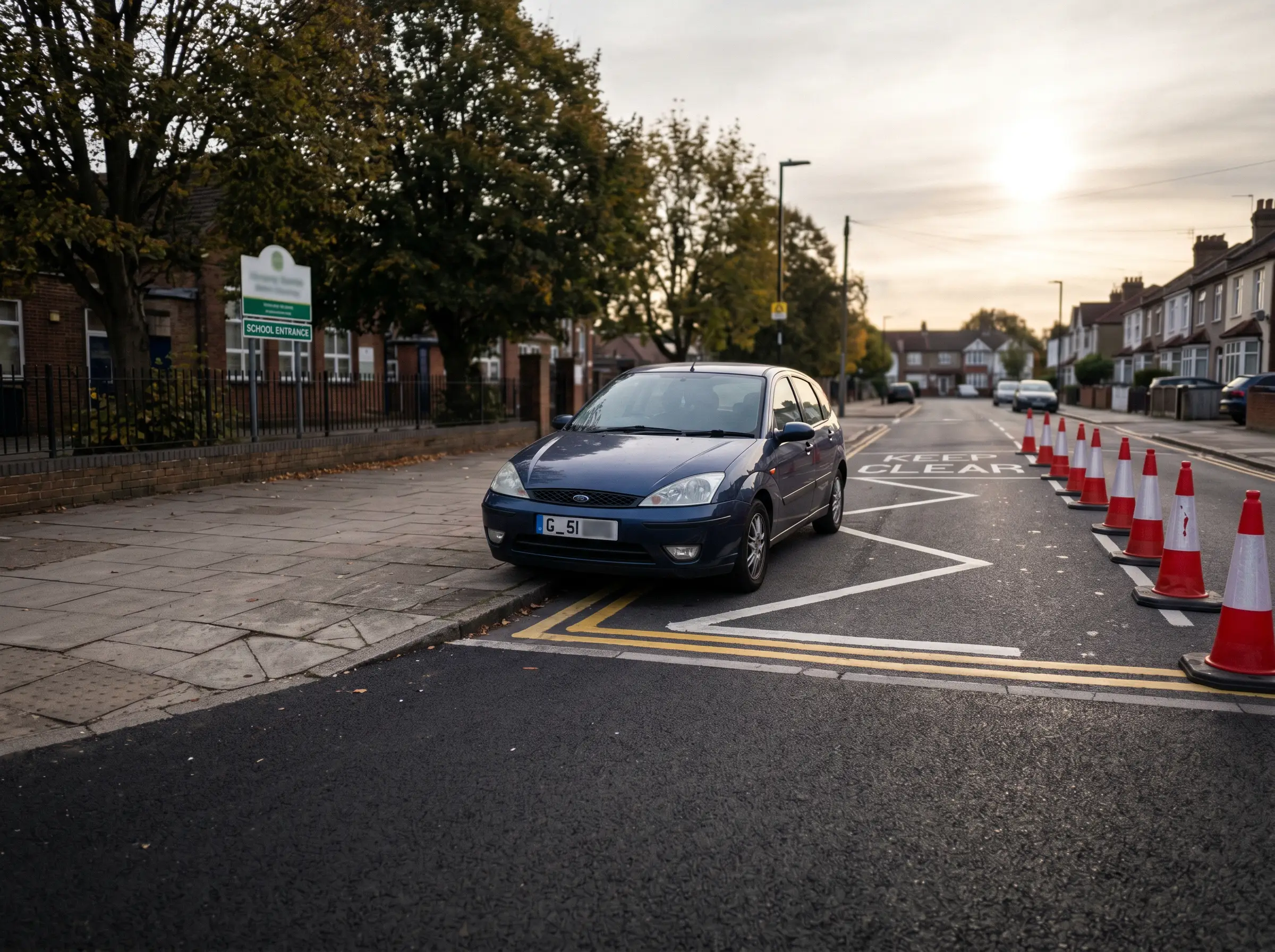 Vehicle stopped in active school restriction
08:37 · Primary school frontage
Vehicle stopped in active school restriction
08:37 · Primary school frontage
Stopping or parking during active school restriction
Aero Ranger keeps the issue photos, place context, rule context and follow-up state together so the case can be checked later without rebuilding the record.
The issue photo stays on SZ-62107 with the case note and current case status.
Site, street, reserve, bay, kerbside or zone context stays attached so reviewers can see where the issue occurred.
The relevant signage, permit condition, local-law category or operating rule is recorded beside the issue evidence.
Later photos, reinspection notes, notice evidence and closure decisions remain in the same case trail.
School-zone parking work happens in short, sensitive peaks. Council needs to manage safety, parent behaviour, signage, complaints and evidence in a tight morning or afternoon window.
Confirm no-stopping, no-parking, bus, kiss-and-ride, crossing and accessible bay rules, including active school-day times.
Capture unsafe stopping, dwell, obstruction, repeat vehicles, photos and officer notes while keeping education and safety context visible.
Issue or warn where appropriate, respond to complaints, report repeat frontages and brief schools or transport teams on recurring pressure.
School frontage, no-stopping area, crossing zone, pick-up or drop-off window, active dates and signage notes.
Rego, vehicle type, position, dwell duration, manoeuvre context and repeat history where relevant.
Photos, ANPR read, timestamp, officer notes, safety context and any repeat observation.
Educate, warn, issue, refer, schedule extra patrols, close or flag repeat pressure to managers.
Peak-window pressure, repeat schools, repeated vehicles, patrol coverage and education campaign outcomes.
Teams can map school frontages, configure peak windows and use targeted patrols to manage repeat pressure without treating every street the same.
Define the streets, bays, crossings and control areas around each school.
Apply morning and afternoon profiles, holidays and event overrides.
Use patrol reads and field observations during the active window.
Check evidence, rule context, vehicle history and offence mapping.
Use Intel and exports to brief operations leaders and school stakeholders.
Once zones, vehicle sightings, evidence and case flows are configured, related compliance categories can use the same platform pattern.
Use scheduled kerb rules for bus, loading and no-stopping areas.
Apply active windows, grace and review evidence to timed controls.
Use permit review and careful evidence standards around sensitive bays.
Use temporary profiles and reporting for special school or community events.
Use these CORE guides when setting up the zones, cases, permits, evidence templates, notices and reports that support this operating model.
Configure zone boundaries, paid parking scope, schedules, active profiles and map context.
Open guide ->Set profiles, max stay, grace, vehicle-type restrictions, detection confidence and repeat handling.
Open guide ->Configure rule-based alerts, authorised vehicle lists, dwell thresholds and reports review pathways.
Open guide ->Capture field observations, photos, GPS context, findings and follow-up tasks.
Open guide ->Map detected decisions to local-law offences, enforcement outcomes and notice settings.
Open guide ->Review vehicle movement, route coverage, repeated sightings and location history.
Open guide ->Share the short brochure with stakeholders, then use the procurement guide to frame requirements, governance, rollout and evaluation.
A client-ready summary of the operating problem, the workflow, and how Aero Ranger helps council teams manage it.
Open brochure - PDFA practical buying guide for requirements, evidence, local-law setup, integrations, governance and pilot planning.
Open guide - PDFBring one school frontage and we will map active windows, restrictions, evidence capture, case review and reporting.

